

 | Localization of Patagames UWP Controls |
Localization is the process of making application multilingual by formatting the content according to the cultures. This involves configuring the application for a specific language. Culture is the combination of language and location. For example, en-US is the culture for English spoken in United States; en-GB is the culture for English spoken in Great Britain.
Patagames components support localization and have their own neutral resources. These resources can be localized as per the customer requirement, using custom .resw files and registering them via compile-time safe mechanism.
 Localize UWP applications using .resw file
Changing application culture
When you are changing the application culture, then you can localize the application based on application culture by creating .resw file.
public sealed partial class MainPage : Page
{
    public MainPage()
    {
        CultureInfo.CurrentUICulture = new CultureInfo("de");
        this.InitializeComponent();
    }
}
Creating .resw files
You can create .resw files for any languages by following steps:
Get the default resource files from Patagames.Pdf.dll/Uwp folder from GitHub.
Right click your project and click New Folder and set name as Strings.
Right click Strings folder, click New Folder and set name according to culture, for example en-US.
Add a new resource file into en-US folder. You can use any custom name for your file, for example Resources.resw or MyUwpUI.resw.
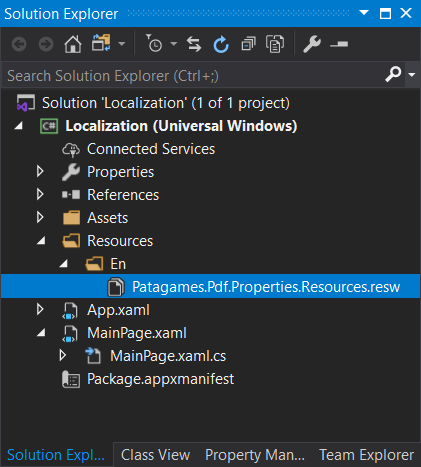
Right click Strings folder, click New Folder and set name for another culture, for example de-DE.
Now, right click on de-DE folder and select Add and then New Item. In the Add New Item wizard, select Resources File option and name the file name exactly matching the file name in the English folder (e.g., MyUwpUI.resw).

Now, select Add and add resource file for German culture in de-DE folder.

Now, you can copy the key names from default resource files (downloaded from GitHub) into your custom resource file and change their corresponding values based on the culture.

Registering custom resources in SDK
The SDK no longer performs dynamic runtime assembly scanning to ensure full compatibility with NativeAOT trimming. You must explicitly register your custom resource loader at the application startup using the ResourceMap identifier of your resource files.
// Register your custom UWP resources during application initialization before creating UI
// "MyUwpUI" matches the custom name of your .resw files
PdfLocalizationManager.UwpUIResources = Windows.ApplicationModel.Resources.ResourceLoader.GetForViewIndependentUse("MyUwpUI");
Editing default culture settings
You can change the default string of any control by adding your custom .resw files to your application and assigning configured ResourceLoader instances to PdfLocalizationManager. All Patagames controls safely fallback to the built-in default resources if a resource key is missing or not provided in your custom loader.
See Also